我让DeepSeek教我网站开发,看看三个月时间能不能学会一些东西。
- Yes2 · 100%
- No0 · 0%


我让DeepSeek教我网站开发,看看三个月时间能不能学会一些东西。
第一天
DeepSeek 教了我一些HTML的知识。
我们先需要建一个新的文本文档,在文件资源管理器里点击查看,显示,文件拓展名,然后我们把后缀改成html,这个后缀会告诉浏览器这是一份html文档,我们用浏览器打开就会得到一个网页。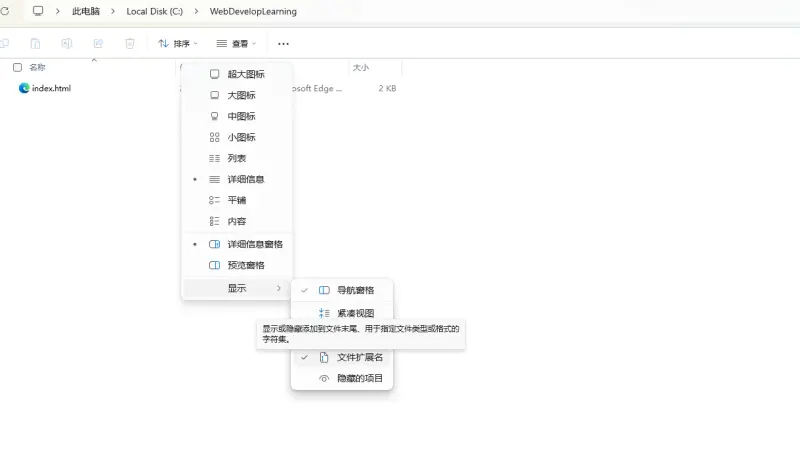
你可以打开记事本把这些代码粘贴上去
<!DOCTYPE html>
<html lang="zh-CN">
<head>
  <meta charset="UTF-8">
  <title>My First Web Page</title>
</head>
<body>
  <h1>Hello, I am Xiaoming</h1>
  <p>I am learning full-stack development.</p>

  <h2>My Hobbies</h2>
  <ul>
    <li>Writing code</li>
    <li>Playing basketball</li>
    <li>Watching movies</li>
  </ul>

  <a href="#">This is my link</a>
</body>
</html>
保存,用浏览器打开它,会看到一个页面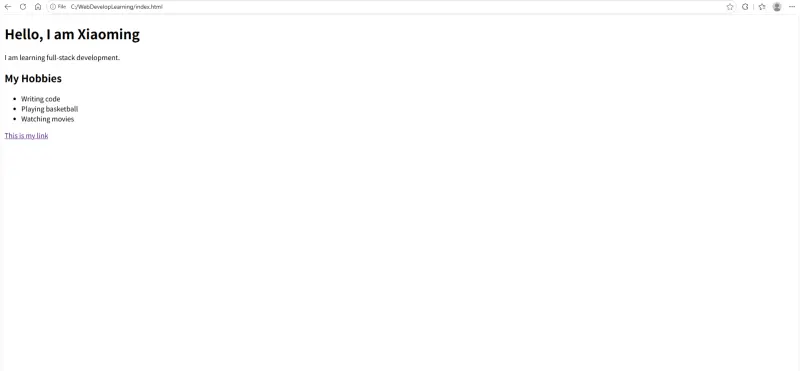
这就是HTML?
总之我们看到我们刚刚粘贴的代码,<!DOCTYPE html>是申明这个文件的格式是html,然后下一行是申明用的中文,再下面<meta charset="UTF-8">是说什么我们也不用管,带上就好了。
有两个点我们可以注意,第一个是html文档里,我们想要写一些东西,需要用相应的tags头尾包起来,比如<head></head>,`<p></p>之类的,它们都有相应的意思,我让DeepSeek给我们整理一份放到下一楼。
Here is a complete reference sheet of all the HTML tags and attributes we have covered so far. Save this! You will use it constantly.
| Tag | English Name | Chinese | Meaning / Purpose |
|---|---|---|---|
<!DOCTYPE html> | Document Type Declaration | 文档类型声明 | Tells the browser this is an HTML5 document. |
<html> | Root Element | 根元素 | Wraps the entire page. Contains <head> and <body>. |
<head> | Metadata Container | 元数据容器 | Invisible info about the page (title, encoding). |
<meta> | Metadata | 元数据 | Extra info. Most common: <meta charset="UTF-8"> for character encoding (字符编码). |
<title> | Page Title | 页面标题 | Shows in the browser tab (浏览器标签页). |
<body> | Body | 主体 | All visible content goes here. |
| Tag | English Name | Chinese | Meaning / Purpose |
|---|---|---|---|
<h1> to <h6> | Headings | 标题 | Section titles. <h1> is the main title (use only one per page). |
<p> | Paragraph | 段落 | A block of text. Browsers add margin (外边距) automatically. |
<br> | Line Break | 换行 | Moves text to the next line. Empty element (空元素). |
<br><br> | Double Line Break | 双换行 | Creates a blank line (空行). |
<hr> | Horizontal Rule | 水平分割线 | A thematic break between sections. Empty element. |
<ul> | Unordered List | 无序列表 | A bulleted list. |
<li> | List Item | 列表项 | An item inside <ul> or <ol>. |
© | HTML Entity | HTML 实体 | Displays the © symbol. |
| Tag / Attribute | English Name | Chinese | Meaning / Purpose |
|---|---|---|---|
<a> | Anchor | 锚 / 链接 | Creates a clickable link. |
href | Hypertext Reference | 超文本引用 | The link destination. https:// for external, # for placeholder. |
<img> | Image | 图像 | Embeds an image. Empty element. |
src | Source | 来源 | The path to the image file. |
alt | Alternative Text | 替代文本 | Description of the image. Shows if image fails to load. |
| Tag / Attribute | English Name | Chinese | Meaning / Purpose |
|---|---|---|---|
<form> | Form | 表单 | Container for user input. |
<label> | Label | 标签 | Text description for an input. |
for | For Attribute | 关联属性 | Must match the input's id to connect them. |
<input> | Input | 输入框 | A field where users type. Empty element. |
type="text" | Text Input | 文本输入 | Normal text field. |
type="password" | Password Input | 密码输入 | Hides characters with dots. |
type="email" | Email Input | 邮箱输入 | Requires email format (must contain @). |
placeholder | Placeholder | 占位符 | Faded hint text inside an input. |
id | Identifier | 标识符 | A unique name for an element. |
<button> | Button | 按钮 | A clickable button. type="submit" submits the form. |
| Tag | English Name | Chinese | Meaning / Purpose |
|---|---|---|---|
<header> | Header | 页头 | Top section of the page (logo, title). Visible. |
<nav> | Navigation | 导航 | A group of navigation links. |
<main> | Main | 主体内容 | The main content of the page. Use only one. |
<section> | Section | 区块 | A distinct section of content. |
<article> | Article | 文章 | A self-contained piece of content (like a blog post). |
<footer> | Footer | 页脚 | Bottom section (copyright, contact info). |
<div> | Division | 区块 | A generic container. No semantic meaning. |
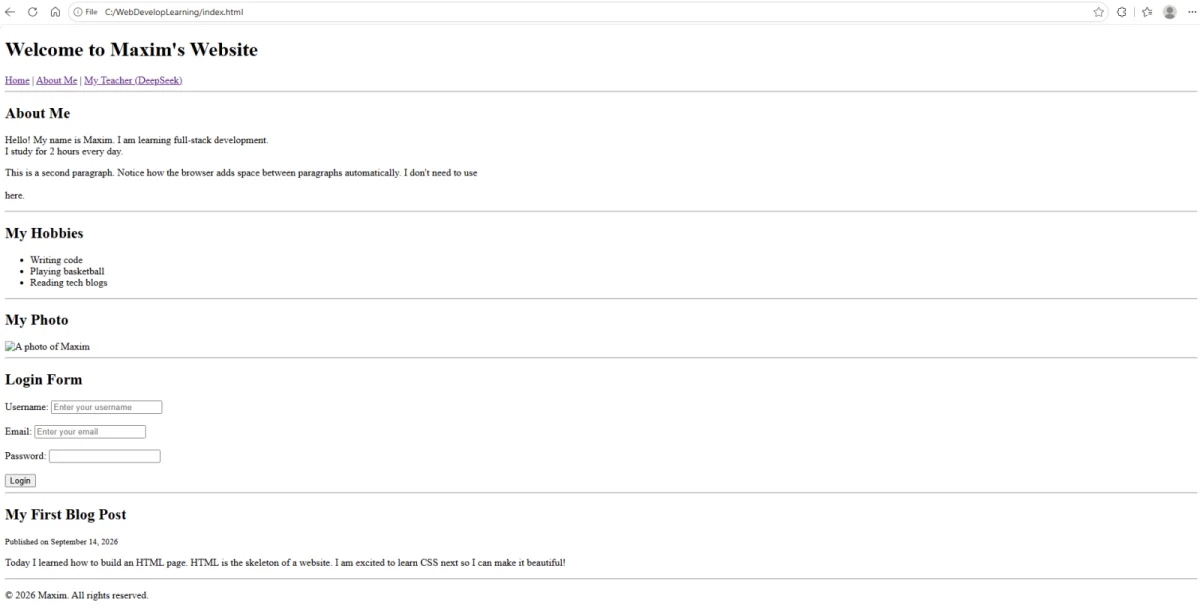
<br>, <hr>, <img>, <input>, <meta>.<p></p>, <h1></h1>, <ul></ul>.<head> vs <header>: <head> is invisible metadata. <header> is a visible page section.<title> vs <h1>: <title> shows in the browser tab. <h1> shows on the page.href needs https:// for external websites. Without it, the browser looks for a local file.<br> in the middle of a sentence is bad practice. Let text flow naturally inside <p>.这里有个示例的代码,粘贴到你的.html文档然后打开看看会是怎样的
<!DOCTYPE html>
<html lang="en">
<head>
<meta charset="UTF-8">
<title>Maxim's HTML Example</title>
</head>
<body>
<!-- ===== HEADER SECTION ===== -->
<header>
<h1>Welcome to Maxim's Website</h1>
<nav>
<a href="#">Home</a> |
<a href="#">About Me</a> |
<a href="https://www.deepseek.com">My Teacher (DeepSeek)</a>
</nav>
<hr> <!-- Horizontal rule to separate header from main content -->
</header>
<!-- ===== MAIN CONTENT ===== -->
<main>
<!-- 1. About Section (Paragraphs, Line Breaks) -->
<section>
<h2>About Me</h2>
<p>
Hello! My name is Maxim. I am learning full-stack development. <br>
I study for 2 hours every day.
</p>
<p>
This is a second paragraph. Notice how the browser adds space
between paragraphs automatically. I don't need to use <br><br> here.
</p>
</section>
<hr>
<!-- 2. Hobbies Section (Unordered List) -->
<section>
<h2>My Hobbies</h2>
<ul>
<li>Writing code</li>
<li>Playing basketball</li>
<li>Reading tech blogs</li>
</ul>
</section>
<hr>
<!-- 3. Image Section -->
<section>
<h2>My Photo</h2>
<!-- The image will be broken because we don't have this file,
but the alt text will show up! -->
<img src="myphoto.jpg" alt="A photo of Maxim" width="200">
</section>
<hr>
<!-- 4. Form Section (Inputs, Labels, Buttons) -->
<section>
<h2>Login Form</h2>
<form>
<label for="username">Username:</label>
<input type="text" id="username" placeholder="Enter your username">
<br><br>
<label for="email">Email:</label>
<input type="email" id="email" placeholder="Enter your email">
<br><br>
<label for="password">Password:</label>
<input type="password" id="password">
<br><br>
<button type="submit">Login</button>
</form>
</section>
<hr>
<!-- 5. Article Section (Blog Post) -->
<article>
<h2>My First Blog Post</h2>
<p><small>Published on September 14, 2026</small></p>
<p>
Today I learned how to build an HTML page. HTML is the skeleton
of a website. I am excited to learn CSS next so I can make it beautiful!
</p>
</article>
</main>
<!-- ===== FOOTER SECTION ===== -->
<footer>
<hr>
<p>© 2026 Maxim. All rights reserved.</p>
</footer>
</body>
</html>可以问一下DeepSeek总结一下这些东西的用法。
以下是针对刚才那个 example.html 文件的重要知识点总结。我全部用中文讲解,重点拆解你要求的 href、图片(Image)和表单(Form)的用法。
href 的用法(超链接)在 HTML 中,<a> 标签(Anchor,锚/链接)用于创建超链接。核心属性是 href(Hypertext Reference,超文本引用)。它有四种常见写法:
| 写法 | 示例 | 含义 |
|---|---|---|
| 外部链接 | href="https://www.deepseek.com" | 跳转到互联网上的其他网站。必须带 https:// 协议(协议),否则浏览器会当成你电脑里的本地文件。 |
| 占位链接 | href="#" | 一个假链接(占位符,Placeholder),点击不会跳转,只会回到页面顶部。常用于还没想好链接去哪里的场景。 |
| 本地文件链接 | href="about.html" | 跳转到你自己项目里的另一个 HTML 文件。不需要 https://。 |
| 锚点链接 | href="#section1" | 跳转到当前页面中 id="section1" 的位置(目前先了解,后面会细讲)。 |
⚠️ 重点记忆:外部网站必须写 https://,本地文件不写。
在 HTML 中,图片用 <img> 标签(Image,图像)插入。它是一个空元素(Empty Element),没有闭合标签。
核心属性:
src(Source,来源):图片的文件路径。可以是本地文件(如 myphoto.jpg),也可以是网络图片(如 https://...)。alt(Alternative Text,替代文本):图片的文字描述。非常重要,因为:width / height(宽度 / 高度):控制图片大小,单位是像素(Pixel,像素)。示例:
<img src="myphoto.jpg" alt="A photo of Maxim" width="200">这句话的意思是:插入一张叫 myphoto.jpg 的图片,如果加载失败就显示 "A photo of Maxim",宽度是 200 像素。
表单用于收集用户输入(Input,输入)。在 example.html 中,我们构建了一个登录表单。
1. <form> 容器
所有表单元素都放在 <form> 标签内部。它就像一个盒子,把输入框和按钮装在一起。
2. <label> 与 for / id 的关联
<label for="username">Username:</label>
<input type="text" id="username"><label>(标签):显示给用户看的文字。for 属性(关联属性):它的值必须和对应 <input> 的 id 完全一致。3. <input> 的常见 type(类型)
type="text"(文本输入):普通文本,如用户名。type="email"(邮箱输入):浏览器会自动检查是否包含 @ 符号。type="password"(密码输入):输入的内容会变成圆点,隐藏起来。4. placeholder(占位符)
<input type="text" id="username" placeholder="Enter your username">placeholder 是输入框里灰色的提示文字,告诉用户该填什么。一旦用户开始输入,它就消失了。
5. <button> 按钮
<button type="submit">Login</button>type="submit" 表示这是一个提交按钮。点击后,浏览器会把表单里的数据发送出去(目前还没学后端,所以暂时不会真的发送)。
example.html 用了大量语义化标签,让代码结构清晰:
<header>(页头):顶部区域,放标题和导航。<nav>(导航):放链接菜单。<main>(主体):页面唯一的核心内容区。<section>(区块):把内容分成不同的小节(如 About Me、Hobbies、Login Form)。<article>(文章):独立的内容块,比如一篇博客。<footer>(页脚):底部区域,放版权信息。<h1> 到 <h6>:标题层级,<h1> 全页只能有一个。<p>:段落,浏览器会自动在段落之间加间距。<br>:强制换行(空元素)。<hr>:水平分割线(空元素),常用于分隔不同区块。<ul> + <li>:无序列表,适合罗列兴趣爱好、菜单等。©:HTML 实体(Entity),显示版权符号 ©。<small>:让文字变小,常用于显示日期、注释等次要信息。<!-- 这是一条注释,浏览器不会显示 -->注释是写给人看的,浏览器会忽略。用来标记代码区块,方便以后自己或别人阅读。
子元素要比父元素多缩进一级(通常是 2 个空格)。这是最佳实践(Best Practice),能让代码可读性(Readability)大大提高。
好的,用中文为你总结 href 路径(Path)的书写规则。这是一份路径书写速查表(Cheat Sheet),一定要记牢。
href 路径书写规则总结永远使用“相对路径(Relative Path)”,绝对不要使用“绝对路径(Absolute Path)”。
C:\Users\Maxim\Desktop\about.html(绝对路径,上传到网上必失效)about.html(相对路径,浏览器会根据当前位置自动寻找)假设你现在在 index.html 文件里,需要链接到其他文件:
写法:直接写文件名
<a href="about.html">关于我</a>原理:浏览器在当前文件夹里找 about.html。
写法:写子文件夹名 / 文件名
<a href="pages/about.html">关于我</a>原理:浏览器先进入 pages 文件夹,再找 about.html。
写法:../ + 文件名
<a href="../about.html">关于我</a>原理:../(点点斜杠)代表向上走一层。
写法:../../ + 文件名
<a href="../../about.html">关于我</a>原理:../../ 代表向上走两层。
写法:../ + 目标同级文件夹名 / 文件名
<a href="../../B2/about.html">关于我</a>原理:先 ../ 向上走两层到 A,再 B2/ 向下进入 B2,最后找到 about.html。
| 符号 | 英文名称 | 中文含义 | 作用 |
|---|---|---|---|
/ | Slash | 斜杠 | 向下进入文件夹 |
../ | Dot Dot Slash | 点点斜杠 | 向上返回一层 |
../../ | Double Dot Dot Slash | 双点点斜杠 | 向上返回两层 |
# | Hash | 井号 | 占位符(假链接,跳回页面顶部) |
https:// | Protocol | 协议 | 外部网站(必须写) |
/,不能用 \(Windows 习惯用反斜杠,但 HTML 里必须用正斜杠)。About.html 和 about.html 是两个不同的文件。建议全小写。C:\ 或 D:\。href="https://deepseek.com" 不能写成 href="deepseek.com"。为了避免路径混乱,你现在做 about.html 时,请直接把 index.html 和 about.html 放在同一个文件夹里。
这样你只需要写:
<a href="about.html">About Me</a>和
<a href="index.html">Home</a>这是最简单、最不容易出错的方式。
/,用于向下进入文件夹。../,用于向上返回一层。2026/9/16
Sorry I didn't update this post for one or two days. But I kept studied about Web Development. I studied CSS. I wanna finish the study of JavaScript tonight so tomorrow I will make up for the missed update.